How it works
From shutter to record, without re-filing.
Every photo taken with the Wenvar camera is time-stamped at the shutter and filed straight to the project. It uploads once coverage is available, picks up a suggested caption if AI captions are on, and is plotted on the project map when a fresh GPS fix is recorded.
Capture
A camera that fills in the register.
The top of the viewfinder previews the stamp: the map on the left, time and place on the right. The time and the GPS location are recorded on capture, written into the record and printed onto the photo. The location is the device's own GPS reading, taken within 15 seconds of the shutter, never an older or guessed one. If the signal is weak, the viewfinder tells you before you take the photo.
- iPhone
- The Wenvar app, from a link your project admin sends.
- Android
- The web camera in Chrome or Samsung Internet, pinned to the home screen: the same stamp, waiting up to 15 seconds after the press for a position, uploading while the camera is open.
- Register
- Online, in a web browser on a laptop or desktop, for everyone with a register seat.
Details: shutter, zoom and tags
The viewfinder previews the stamp, and the record can end up slightly better than the preview: after the press the iPhone can settle on a more accurate position within about 2 seconds, when the first was rough, and add a street name that arrives within 1.5 seconds. On iPhone, an address missing from a stamp can also be looked up again when the photo uploads, so the register can hold an address the stamp lacks. The volume buttons work as a shutter, and so does the Camera Control button on newer iPhones, because gloves and rain make a touchscreen unreliable. On iPhone, zoom presets use the ultra-wide and telephoto lenses where the phone has them; the presets shown depend on the model.
Right after each photo, a small sheet takes working tags, typed where the knowledge exists: “defect 12” files defect and 12, recent tags are one tap, Skip files it untagged. The photo’s upload never waits on the sheet.
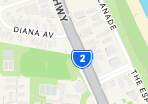 -28.08570, 153.44890
Upload
Works without coverage.
Photos are saved on the phone the instant they are taken and upload whenever coverage allows. On iPhone the upload carries on in the background after you leave the app, within the limits iOS sets; the Android web camera uploads while the camera is open. A photo keeps the time it was taken, not the time it uploaded, and Recent photos shows where each one is: waiting, uploading or in the register.
Details: the upload queue
The upload queue is shown in the camera: pending counts down, synced means every record is filed. A failed item says why and offers one Retry all. Basement pours, remote work fronts and dead spots do not interrupt the record.
Recent photos
Today3 photos
Yesterday3 photos
Monday 24 Aug2 photos
Taken at 2:15 pm in a dead spot, the scaffold photo waits on the phone and files with that time once there is coverage.
File & find
Records that read like a register, not a camera roll.
Where your company switches on AI captions and the person taking the photo allows them, each photo gets a suggested caption in plain site language, ready to edit; once a person has edited a caption, it is never overwritten. Without them, captions are written by hand. Everyone with a register seat searches by words, tag, person, site role, provenance or date, matching from the first keystroke, and records from departed crew stay findable and attributed.
Details: search, columns and selection
In the words box a space means all terms, a comma means either, and a leading minus excludes: the register below is searched for kerb, footpath or barrier, but not patch. Tags are working notes anyone with a register seat can edit inline: a defect number, a work front, an inspection round.
Columns show, hide and resize per person and are remembered. Select records the way you select files, then download, report or remove them together; a duplicates view catches identical files by content and offers “Select all but one of each”.
Varsity Lakes Stage 1 ▾
Evidence register · 1–6 of 6 · filtered
| Photo | Taken ↓ | Caption | Tags | Provenance | |
|---|---|---|---|---|---|
| 26 Aug 202611:05 am AEST | Footpath at lot 9 curing, joints cut | Wenvar captureMP · SUP | |||
| 26 Aug 202609:30 am AEST | Barrier panels delivered and stacked at the north gate | Wenvar captureDK · ENG | |||
| 25 Aug 202607:52 am AEST | Kerb and channel poured to lot 12, forms to strip tomorrow | Wenvar captureMP · SUP | |||
| 24 Aug 202603:30 pm AEST | Kerb poured to lot 14 boundary, formwork stripped clean | Wenvar captureMP · SUP | |||
| 23 Aug 202603:44 pm AEST | Footpath slab reinforcement tied ahead of tomorrow’s pour | Wenvar captureJL · QA | |||
| 22 Aug 202610:18 am AEST | Water-filled barriers set along the Bermuda Street frontage | Wenvar captureDK · ENG |
Locate
The project, seen from above.
Records with a recorded position are plotted where they were taken, the newest 2,000 at a time, and the map says when that limit applies. Nearby pins form one numbered group; open it and its newest 50 records are there with their thumbnails, times and filers, with a line saying how many more the group holds. A pin is green when its group holds at least one in-app Wenvar capture and grey when it holds imports only.
One switch turns the same records into Busy areas: a glow from quiet green to busy red that shows where the team has worked most, counted in visits rather than photos. Try the switch on the home page
Two years on, when someone asks which services run under a slab, set the dates and zoom to it. The records the project has kept from that spot are there, under the name of whoever took them, even if they have since left.
Details: groups and visits
Groups are formed by what is near each other on screen and re-formed at every zoom, so a busy pour reads as one group, not a hundred pins.
A visit is one person’s photos, each within 10 minutes of the one before and within about 30 metres of where the visit started: twenty-five photos at one spot are one visit, and a crew of five stopping there is five. Busy areas uses the same dates, roles and people as the pins; zooming in brings the pins back over the glow, and the map always opens on Pins.
Shift reports
Shift reports, generated from the register.
Select the team members and a date range, then generate the shift report. Each activity becomes a line item under its shift date, with its time, location and team member. The output is one Excel workbook: a summary of the photos at each location on each shift, then the line items, each linked to its photo in the register. Activities are described by AI from the photo captions.
Details: shift times and photos
Each shift runs 6 am to 6 am, so night works stay within one shift. Photos can be included in the workbook.
Import
Bring the photos you already have.
Drag in files or whole folders. Before anything uploads, every photo is sorted by what is stored inside it (capture time and position, capture time only, or no capture data), with live counts, and exact copies already in the register are skipped, even renamed ones. The register and PDF reports mark every record as an in-app capture or an import; on the map, a group's pin shows green if it holds any in-app capture.
Details: photos with no capture data
For photos stripped by chat re-encoding there are up to three explicit choices: have AI read the stamp printed on the image (only where AI captions are on for the project, and behind an itemised consent), state one capture date for the batch, or import as-is with nothing claimed.
Built for the site, not the office
The details that matter on site.
One account per person
Everyone captures under their own name. Removing someone stops their access to the project, and their records stay attributed to them.
Site-local time
Capture times are shown in the local time where the photo was taken, whoever is viewing and wherever they are.
Projects, not folders
Photos are filed to a project at capture, and the camera shows which one. Switching projects is a deliberate step, so records land in the register you chose.
No expiring image links
Photos load through Wenvar's own signed-in routes rather than through links that quietly expire, so an image does not stop loading because a link ran out.
Built-in cleanup
One filter gathers stuck or empty records, another gathers exact duplicates by file content, ready to clear in one selection.
Plain about data
Where records live, what leaves Australia and what we choose not to claim: it is written down on our security and privacy pages. Read the security page.
See it on your project.
Wenvar is invite-only. Tell us about your project and we will reply by email, usually within one business day.